这一节会介绍WebSocket协议,和在UE4中如何使用WebSocket进行通讯。引擎中内置了现成的WebSockets模块和第三方库“libWebSockets”,接下来会调用现有模块来创建两个插件,分别负责创建WebSocket服务器和WebSocket客户端。
为什么是WebSocket
WebSocket是一种全双工、双向通信协议,设计用于在单个TCP连接上进行实时通信。
WebSocket特点
1、双向通信:客户端和服务器可以在任何时间相互发送消息,而不需要轮询或长轮询。
2、低延迟:因为它建立在TCP连接之上,并且避免了HTTP请求和响应的开销,WebSocket通信具有较低的延迟。
3、持久连接:WebSocket连接一旦建立,可以持续使用,直到客户端或服务器主动关闭连接。
工作原理
1、握手阶段:WebSocket通信开始时,客户端发起一个标准的HTTP请求,包含一些特殊的头信息,表明它希望升级到WebSocket协议。
2、协议升级:如果服务器支持WebSocket协议,它会通过HTTP响应确认升级请求。完成握手后,HTTP连接升级为WebSocket连接。
3、数据传输:握手完成后,客户端和服务器之间可以通过WebSocket协议进行全双工通信,可以传输文本和二进制等格式消息。
使用场景#
WebSocket协议适用于需要实时更新和低延迟的应用,如:
1、即时通讯:如聊天应用和消息系统。
2、实时通知:如股票价格更新、体育比分等。
3、在线游戏:需要快速、频繁的状态更新。
4、协同编辑:如多人同时编辑文档、表格等。
和HTTP区别
1、HTTP有一个缺陷就是通讯只能由客户端发起,它们只能单向请求,如果客户端需要监测服务器中会连续变化的某一参数,我们只能使用“轮询”,即没隔一段时间就发送一个查询请求,这种轮询效率比较低,且浪费资源。
2、WebSocket连接一旦建立,客户端和服务器都可以主动发送消息给彼此,即它是一种双向通讯。
WebSocket协议提供了一种高效、低延迟的双向通信方式,适用于需要实时数据传输的应用场景。通过WebSocket,客户端和服务器可以在单个持久TCP连接上自由地交换数据,而不必受到传统HTTP请求/响应模式的限制。
客户端实现
Unreal Engine中的“Runtime/Online/下有一个”WebSocket“模块,模块中的IWebSocket接口提供了客户端常用的功能,连接、关闭、发送消息等。
1、创建插件后在.Build.cs中加入”WebSockets“模块
1
2
3
4
5
6
7
8
|
PublicDependencyModuleNames.AddRange(
new string[]
{
"Core",
"WebSockets",.
}
);
|
2、我这里创建一个继承自UObject的类:UWSClients。WSClients.h实现如下:
/*********************************************************
*
- @copyright
- @author Imrcao
- @date 2024年06月27日16:25:00
- @brief 创建一个WebSocket客户端,支持Win64,Win32,IOS,MacOS,Linux平台
- @See
**********************************************************/
 1
 2
 3
 4
 5
 6
 7
 8
 9
10
11
12
13
14
15
16
17
18
19
20
21
22
23
24
25
26
27
28
29
30
31
32
33
34
35
36
37
38
39
40
41
42
43
44
45
46
47
48
49
50
51
52
53
54
55
|
#pragma once

#include "CoreMinimal.h"
#include "UObject/NoExportTypes.h"
#include "WSClients.generated.h"

/**
* WebSocketClient
*/
UCLASS(BlueprintType)
class WEBSOCKETCLIENT_API UWSClients : public UObject
{
GENERATED_BODY()

public:
UWSClients();
~UWSClients();

public:
virtual void BeginDestroy() override;

public:
UFUNCTION(BlueprintCallable)
UWSClients* GetorCreateWsClientInstance();

UFUNCTION(BlueprintCallable, Category = "WSClient")
bool InitAndConnect(FString WsAddr);

UFUNCTION(BlueprintCallable, Category = "WSClient")
void Send(const FString& Data);

void Send(const void* Data, SIZE_T Size, bool bIsBinary = false);

UFUNCTION()
void OnConnected();

UFUNCTION()
void OnConnectedError(const FString& Error);

UFUNCTION()
void OnClosed(int32 StatusCode, const FString& Reason, bool bWasClean);

UFUNCTION()
void OnMessage(const FString& MessageString);

UFUNCTION()
void OnMessageSent(const FString& MessageString);

//UFUNCTION()
void OnRawMessage(const void* data, SIZE_T Size, SIZE_T BytesRemaining);

private:
UWSClients* WSClientInstance;
TSharedPtr<class IWebSocket> WebSocket;
};
|
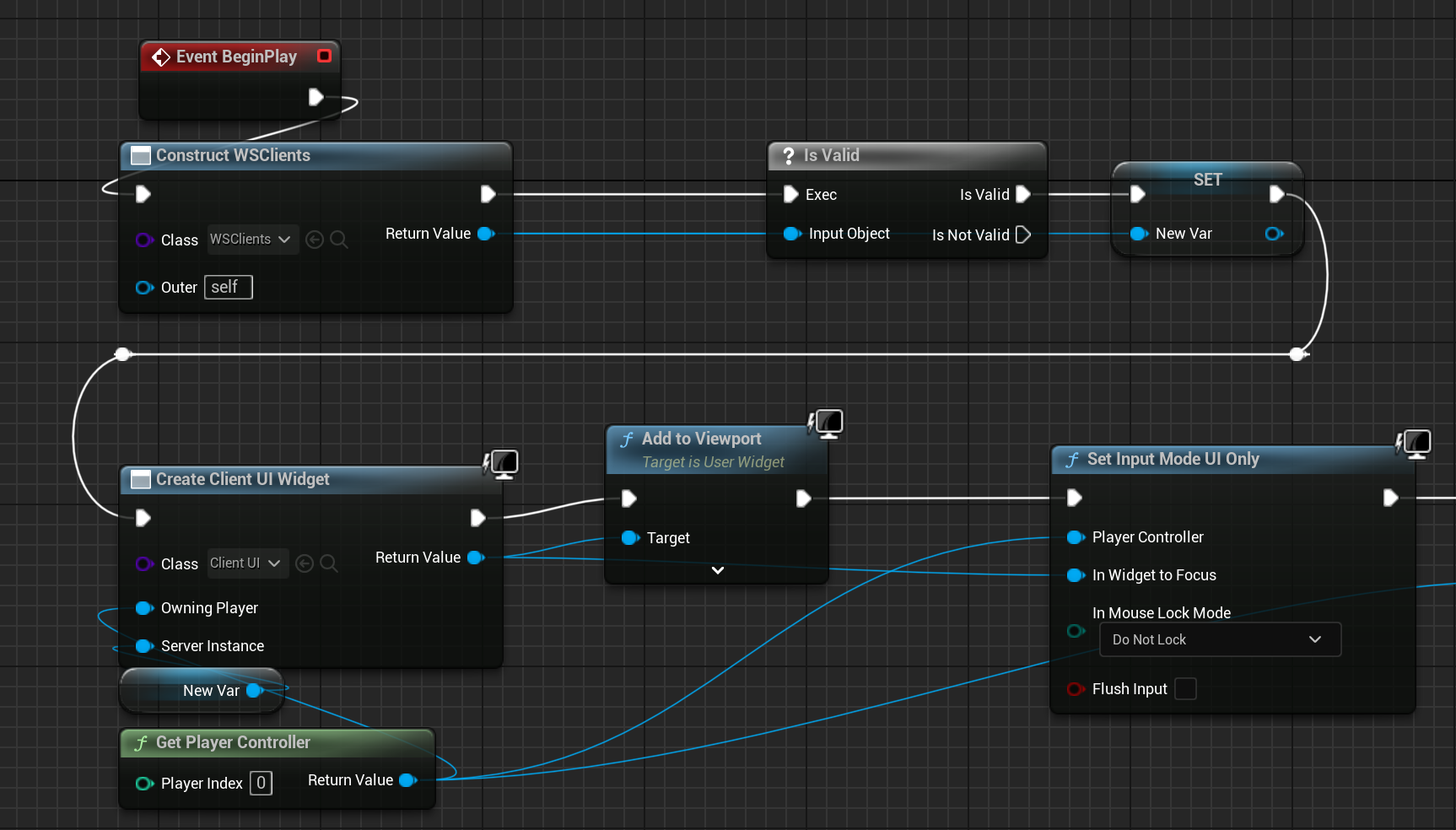
3、WSClients.cpp实现如下。起初我是创建了一个全局静态的指针变量,将这个函数GetorCreateWsClientInstance写成了静态函数,可以直接在蓝图中调用了,这样做的话会有个问题,在UE编辑器模式下,由于引擎对静态成员函数声明周期的管理,退出游戏时,并不会执行析构或者BeginDestroy函数,这就意味着连接无法自动关闭。打包后执行一切都是正常的。为了方便测试这里就不用静态函数,后面在蓝图中直接用ConstructObjectFromClass构建一个UObject。
// Fill out your copyright notice in the Description page of Project Settings.
 1
 2
 3
 4
 5
 6
 7
 8
 9
10
11
12
13
14
15
16
17
18
19
20
21
22
23
24
25
26
27
28
29
30
31
32
33
34
35
36
37
38
39
40
41
42
43
44
45
46
47
48
49
50
51
52
53
54
55
56
57
58
59
60
61
62
63
64
65
66
67
68
69
70
71
72
73
74
75
76
77
78
79
80
81
82
83
84
85
86
87
88
89
90
91
92
93
94
95
|
#include "WSClients.h"
#include "WebSocketsModule.h"
#include "IWebSocket.h"

//UWSClients* UWSClients::WSClientInstance = nullptr;

UWSClients::UWSClients()
{
WebSocket = nullptr;
}
UWSClients::~UWSClients()
{

}

void UWSClients::BeginDestroy()
{
Super::BeginDestroy();

if (WebSocket && WebSocket->IsConnected())
{
WebSocket->Close();
}
}

UWSClients* UWSClients::GetorCreateWsClientInstance()
{
WSClientInstance = WSClientInstance == nullptr ? NewObject<UWSClients>() : WSClientInstance;
WSClientInstance->AddToRoot();

if (!WSClientInstance) { GEngine->AddOnScreenDebugMessage(-1, 3.f, FColor::Red, "ClientInstance is NULL!"); }

return WSClientInstance;
}

bool UWSClients::InitAndConnect(FString WsAddr)
{
if (!FModuleManager::Get().IsModuleLoaded("WebSockets"))
{
FModuleManager::Get().LoadModule("WebSockets");
}

WebSocket = FWebSocketsModule::Get().CreateWebSocket(WsAddr);

WebSocket->OnConnected().AddUObject(this, &UWSClients::OnConnected);
WebSocket->OnConnectionError().AddUObject(this, &UWSClients::OnConnectedError);
WebSocket->OnClosed().AddUObject(this, &UWSClients::OnClosed);
WebSocket->OnMessage().AddUObject(this, &UWSClients::OnMessage);
WebSocket->OnMessageSent().AddUObject(this, &UWSClients::OnMessageSent);
WebSocket->OnRawMessage().AddUObject(this, &UWSClients::OnRawMessage);

WebSocket->Connect();

return !!WebSocket;
}

void UWSClients::Send(const FString& Data)
{
WebSocket->Send(Data);
}

void UWSClients::Send(const void* Data, SIZE_T Size, bool bIsBinary)
{

}

void UWSClients::OnConnected()
{
GEngine->AddOnScreenDebugMessage(-1, 15.0f, FColor::Green, "Successfully connected");
}

void UWSClients::OnConnectedError(const FString& Error)
{
GEngine->AddOnScreenDebugMessage(-1, 15.0f, FColor::Red, Error);
}

void UWSClients::OnClosed(int32 StatusCode, const FString& Reason, bool bWasClean)
{
GEngine->AddOnScreenDebugMessage(-1, 15.0f, bWasClean ? FColor::Green : FColor::Red, "Connection closed " + Reason);
}

void UWSClients::OnMessage(const FString& MessageString)
{
GEngine->AddOnScreenDebugMessage(-1, 15.0f, FColor::Cyan, "Received message: " + MessageString);
}

void UWSClients::OnMessageSent(const FString& MessageString)
{
GEngine->AddOnScreenDebugMessage(-1, 15.0f, FColor::Yellow, "Sent message: " + MessageString);
}

void UWSClients::OnRawMessage(const void* data, SIZE_T Size, SIZE_T BytesRemaining)
{

}
|
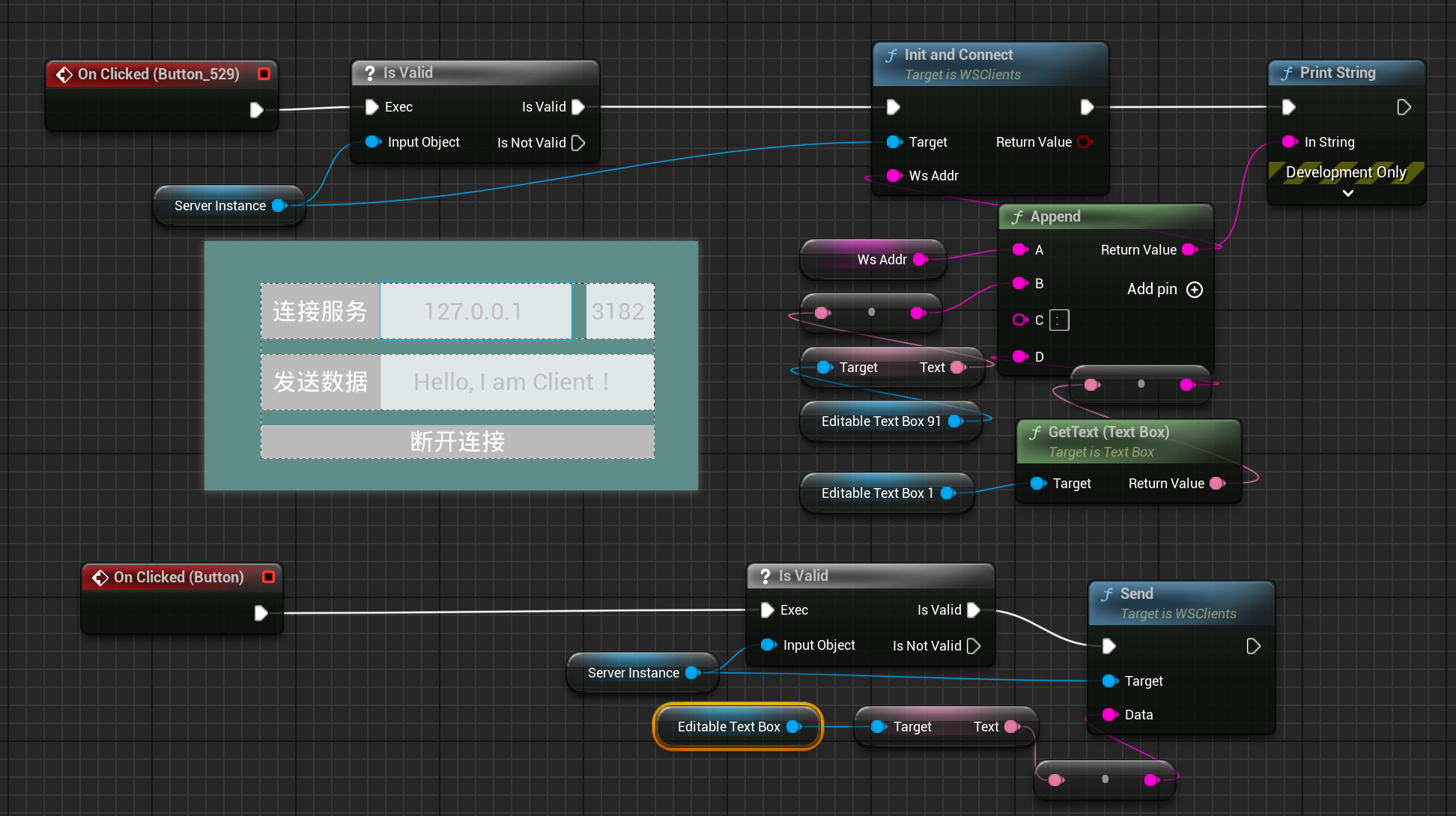
3、蓝图中使用如下图所示
服务端实现
网上大多数的教程都是教怎么写客户端的,关于如何在UE中搭建一个支持WebSocket的服务器,资料很少。其实引擎中有一个现成的插件:WebSocketNetworking
1、同样在.Build.cs文件中加入模块:WebSocketNetworking,并在.uplugin文件中启用插件模块:
“Plugins”: [
{
“Name”: “WebSocketNetworking”,
“Enabled”: true
}
]
2、创建一个继承自UObject的类:UWSServer。服务器需要时刻监听外部客户端的连接,所有需要一个Tick函数。继承自UObject的类,在实例后不会加入引擎中的Tick,AActor和UActorComponent都会加入Tick,如果你的对象也需要每帧去Tick(一般来说是什么Mgr管理器之类的全局单例对象),也非常简单:再继承多一个抽象类FTickableGameObject,重写实现几个纯虚函数即可:
 1
 2
 3
 4
 5
 6
 7
 8
 9
10
11
|
public:
virtual void Tick(float DeltaTime) override;
virtual bool IsTickable() const override;
virtual TStatId GetStatId() const override;
//cpp
void UTickObject::Tick(float DeltaTime)
{}
bool UTickObject::IsTickable() const
{return true;}
TStatId UTickObject::GetStatId() const
{return Super::GetStatID();}
|
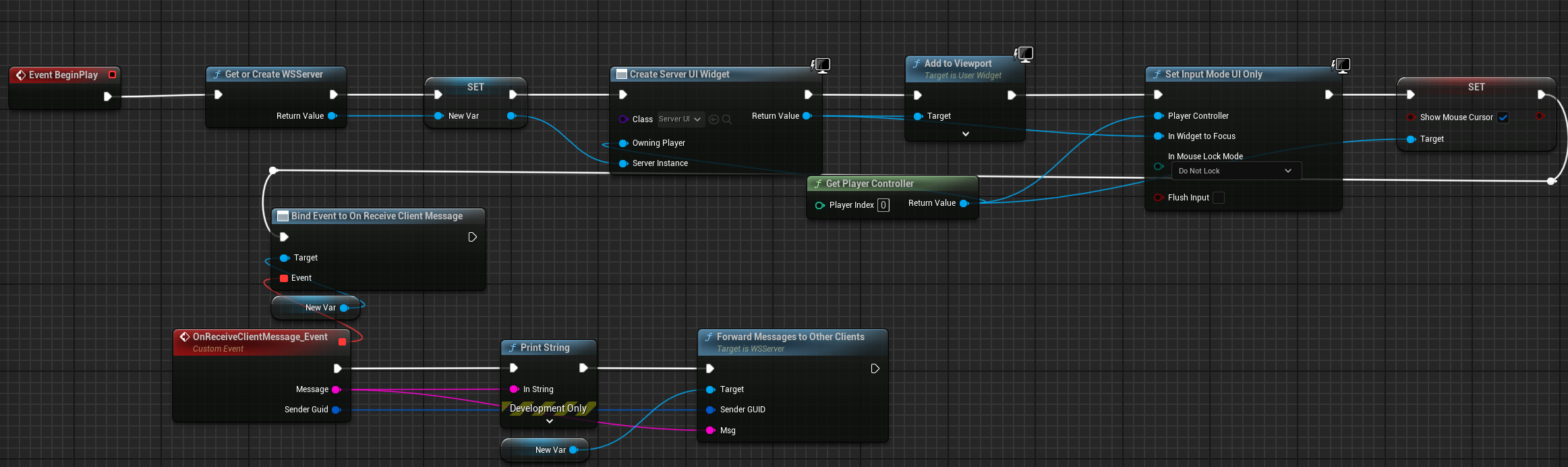
3、WSServer.h文件定义如下:我这声明了一个动态多播代理FOnReceiveClientMessage,在蓝图中绑定,C++中执行,用于当服务器收到消息后,将此消息转发给其它客户端,实现多个客户端之间信息同步的功能。需要注意的是,动态单播代理和静态代理是不支持UE的反射系统的,即你无法使用宏UPROPERTY(BlueprintAssignable/BlueprintCallable)标记.
/*********************************************************
*
- @copyright
- @author Imrcao
- @date 2024年06月27日16:25:00
- @brief 创建一个WebSocket服务器,支持Win64,Win32,Linux平台
- @See
**********************************************************/
  1
  2
  3
  4
  5
  6
  7
  8
  9
 10
 11
 12
 13
 14
 15
 16
 17
 18
 19
 20
 21
 22
 23
 24
 25
 26
 27
 28
 29
 30
 31
 32
 33
 34
 35
 36
 37
 38
 39
 40
 41
 42
 43
 44
 45
 46
 47
 48
 49
 50
 51
 52
 53
 54
 55
 56
 57
 58
 59
 60
 61
 62
 63
 64
 65
 66
 67
 68
 69
 70
 71
 72
 73
 74
 75
 76
 77
 78
 79
 80
 81
 82
 83
 84
 85
 86
 87
 88
 89
 90
 91
 92
 93
 94
 95
 96
 97
 98
 99
100
101
102
103
104
105
106
107
108
109
110
111
112
113
114
115
116
117
118
119
120
121
122
|
#pragma once

#include "CoreMinimal.h"
#include "UObject/NoExportTypes.h"
#include "Tickable.h"
#include "UObject/StrongObjectPtr.h"
#include "Modules/ModuleManager.h"
#include "INetworkingWebSocket.h"
#include "Engine.h"
#include "WSServer.generated.h"

/**
*
*/
DECLARE_MULTICAST_DELEGATE_OneParam(FOnConnectionClosed, FGuid /*ClientId*/);
DECLARE_DYNAMIC_MULTICAST_DELEGATE_TwoParams(FOnReceiveClientMessage, FString, Message, FGuid, SenderGuid);

UCLASS(BlueprintType)
class WEBSOCKETCS_API UWSServer : public UObject, public FTickableGameObject
{
GENERATED_BODY()

public:
UWSServer();
~UWSServer();

public:
//virtual void PostInitProperties() override;
virtual void BeginDestroy() override;

virtual void Tick(float DeltaTime) override;
virtual bool IsTickable() const override;
virtual TStatId GetStatId() const override;

public:

UFUNCTION(BlueprintCallable, Category = "WSServer")
static UWSServer* GetOrCreateWSServer();

UFUNCTION(BlueprintCallable, Category = "WSServer")
bool StartServer(int32 Port);

UFUNCTION(BlueprintCallable, Category = "WSServer")
void StopServer();

//给所有客户端发送消息
UFUNCTION(BlueprintCallable, Category = "WSServer")
void SendMessagesToAllClients(const FString Msg);

//给指定客户端发送消息
UFUNCTION(BlueprintCallable, Category = "WSServer")
void SendMessagesSpecifyClient(const FGuid& ClientGUID, const TArray<uint8>& InUTF8Payload);

//转发消息给其它所有客户端(不包含发送端)
UFUNCTION(BlueprintCallable, Category = "WSServer")
void ForwardMessagesToOtherClients(const FGuid& SenderGUID, const FString Msg);

bool IsRunning() const;

bool WSServerTick(float DeltaTime);

//FOnConnectionClosed& OnConnectionClosed() { return OnConnectionClosedDelegate; }

public:

UPROPERTY(BlueprintAssignable, Category = "MyCategory")
FOnReceiveClientMessage OnReceiveClientMessage;

FOnConnectionClosed OnConnectionClosedDelegate;

private:

void OnWebSocketClientConnected(INetworkingWebSocket* Socket);

void ReceivedRawPacket(void* Data, int32 Size, FGuid ClientId);

void OnSocketClose(INetworkingWebSocket* Socket);

private:
class FWebSocketConnection
{
public:

explicit FWebSocketConnection(INetworkingWebSocket* InSocket)
: Socket(InSocket)
, Id(FGuid::NewGuid())
{
}

FWebSocketConnection(FWebSocketConnection&& WebSocketConnection)
: Id(WebSocketConnection.Id)
{
Socket = WebSocketConnection.Socket;
WebSocketConnection.Socket = nullptr;
}

~FWebSocketConnection()
{
if (Socket)
{
delete Socket;
Socket = nullptr;
}
}
FWebSocketConnection(const FWebSocketConnection&) = delete;
FWebSocketConnection& operator=(const FWebSocketConnection&) = delete;
FWebSocketConnection& operator=(FWebSocketConnection&&) = delete;

/** Underlying WebSocket. */
INetworkingWebSocket* Socket = nullptr;

/** Generated ID for this client. */
FGuid Id;
};

private:
static UWSServer* ServerInstance;

TUniquePtr<class IWebSocketServer> Server;

TArray<FWebSocketConnection> Connections;
};
|
3、WSServer.cpp实现如下:
// Fill out your copyright notice in the Description page of Project Settings.
 1
 2
 3
 4
 5
 6
 7
 8
 9
10
11
12
13
14
15
16
17
18
19
20
21
22
23
24
25
26
27
28
29
30
31
32
33
34
35
36
37
38
39
40
41
42
43
44
45
46
47
48
49
50
51
52
53
54
55
56
57
58
59
60
61
62
63
64
65
66
67
68
69
70
71
72
73
74
|
#include "WSServer.h"
#include "Containers/Ticker.h"
#include "IPAddress.h"
#include "IWebSocketNetworkingModule.h"
#include "WebSocketNetworkingDelegates.h"
#include "WebSocketNetDriver.h"
#include "IWebSocketServer.h"
#include <string>

UWSServer* UWSServer::ServerInstance = nullptr;

UWSServer::UWSServer()
{

}
UWSServer::~UWSServer()
{

}

void UWSServer::BeginDestroy()
{
Super::BeginDestroy();
StopServer();
ServerInstance = nullptr;
}

void UWSServer::Tick(float DeltaTime)
{
WSServerTick(DeltaTime);
}
bool UWSServer::IsTickable() const
{
return true;
}
TStatId UWSServer::GetStatId() const
{
return Super::GetStatID();
}

UWSServer* UWSServer::GetOrCreateWSServer()
{
ServerInstance = ServerInstance == nullptr ? NewObject<UWSServer>() : ServerInstance;
ServerInstance->AddToRoot();
if (!ServerInstance) { GEngine->AddOnScreenDebugMessage(-1, 3.f, FColor::Red, "ServerInstance is NULL!"); }
return ServerInstance;
}

bool UWSServer::StartServer(int32 Port)
{
FWebSocketClientConnectedCallBack CallBack;
CallBack.BindUObject(this, &UWSServer::OnWebSocketClientConnected);

Server = FModuleManager::Get().LoadModuleChecked<IWebSocketNetworkingModule>(TEXT("WebSocketNetworking")).CreateServer();

if (!Server || !Server->Init(Port, CallBack))
{
Server.Reset();
GEngine->AddOnScreenDebugMessage(-1, 3.f, FColor::Red, "Server Startup Failed!");
return false;
}
GEngine->AddOnScreenDebugMessage(-1, 3.f, FColor::Green, FString::Printf(TEXT("Server Startup Success by the port: %d"), Port));
return true;
}
void UWSServer::StopServer()
{
if (IsRunning()) {
Server.Reset();
}
}
bool UWSServer::IsRunning() const
{
/*
*在C++中,两个感叹号(!!)前缀用于将一个表达式的值显式地转换为布尔值。
|
这是一种惯用法,用于确保表达式的结果是一个明确的布尔值(true 或 false)。
*Server 是一个指针,如果它是非空(即指向有效对象),那么 Server 的值是非零的。
!Server 将这个非零值转换为 false,如果 Server 是空指针(即值为零),则 !Server 将返回 true。
再次应用一个感叹号(即 !!Server),将 false 转换为 true,将 true 转换为 false。
最终结果就是将 Server 的值转换为布尔值,如果 Server 是非空指针,结果是 true,如果 Server 是空指针,结果是 false。
*/
1
2
3
4
5
6
|
return !!Server;
}

void UWSServer::OnWebSocketClientConnected(INetworkingWebSocket* Socket)
{
/*ensureMsgf 是 Unreal Engine 4 中用于断言(assertion)的一种宏。断言用于在开发过程中检测程序中的错误条件。
|
如果条件为 false,则会触发断言,通常会记录一条错误信息并在调试器中中断程序执行,以便开发人员可以立即注意到并修复问题。
ensureMsgf 类似于 ensure,但是它允许你提供一个格式化的错误消息,以便在条件不满足时显示更多的调试信息。
/
if (ensureMsgf(Socket, TEXT(“Socket was null while creating a new websocket connection.”)))
{
/{
int32 RawRemoteAddr;
Socket->GetRawRemoteAddr(RawRemoteAddr);
GEngine->AddOnScreenDebugMessage(-1, 3.f, FColor::Green, FString::Printf(TEXT(“RawRemoteAddr: %d”), RawRemoteAddr));
  1
  2
  3
  4
  5
  6
  7
  8
  9
 10
 11
 12
 13
 14
 15
 16
 17
 18
 19
 20
 21
 22
 23
 24
 25
 26
 27
 28
 29
 30
 31
 32
 33
 34
 35
 36
 37
 38
 39
 40
 41
 42
 43
 44
 45
 46
 47
 48
 49
 50
 51
 52
 53
 54
 55
 56
 57
 58
 59
 60
 61
 62
 63
 64
 65
 66
 67
 68
 69
 70
 71
 72
 73
 74
 75
 76
 77
 78
 79
 80
 81
 82
 83
 84
 85
 86
 87
 88
 89
 90
 91
 92
 93
 94
 95
 96
 97
 98
 99
100
|
FString LocalEndPoint = Socket->LocalEndPoint(true);
GEngine->AddOnScreenDebugMessage(-1, 3.f, FColor::Green, FString::Printf(TEXT("LocalEndPoint: %s"), *LocalEndPoint));

FString RemoteEndPoint = Socket->RemoteEndPoint(true);
GEngine->AddOnScreenDebugMessage(-1, 3.f, FColor::Green, FString::Printf(TEXT("RemoteEndPoint: %s"), *RemoteEndPoint));
}*/

FWebSocketConnection Connection = FWebSocketConnection{ Socket };

FWebSocketPacketReceivedCallBack ReceiveCallBack;
ReceiveCallBack.BindUObject(this, &UWSServer::ReceivedRawPacket, Connection.Id);
Socket->SetReceiveCallBack(ReceiveCallBack);

FWebSocketInfoCallBack CloseCallback;
CloseCallback.BindUObject(this, &UWSServer::OnSocketClose, Socket);
Socket->SetSocketClosedCallBack(CloseCallback);

//Socket->

Connections.Add(MoveTemp(Connection));
}
}
void UWSServer::ReceivedRawPacket(void* Data, int32 Size, FGuid ClientId)
{
TArrayView<uint8> dataArrayView = MakeArrayView(static_cast<uint8*>(Data), Size);
const std::string cstr(reinterpret_cast<const char*>(dataArrayView.GetData()), dataArrayView.Num());
FString frameAsFString = UTF8_TO_TCHAR(cstr.c_str());

OnReceiveClientMessage.Broadcast(frameAsFString, ClientId);
}

void UWSServer::SendMessagesToAllClients(const FString Msg)
{
FTCHARToUTF8 utf8Str(*Msg);
int32 utf8StrLen = utf8Str.Length();

TArray<uint8> uint8Array;
uint8Array.SetNum(utf8StrLen);
memcpy(uint8Array.GetData(), utf8Str.Get(), utf8StrLen);

for (auto& ws : Connections) {
ws.Socket->Send(uint8Array.GetData(), uint8Array.Num(), /*PrependSize=*/false);
}
}

void UWSServer::SendMessagesSpecifyClient(const FGuid& ClientGUID, const TArray<uint8>& InUTF8Payload)
{
/*
* FindByPredicate是TArray的一个成员函数,用于查找满足指定条件的第一个元素。
* FindByPredicate函数接受一个谓词函数作为参数。这个谓词函数用于定义查找条件。
* 在下面的函数中谓词函数是一个捕获ClientGUID的lambda表达式:
* [&ClientGUID](const FWebSocketConnection& InConnection) {
return InConnection.Id == ClientGUID;
}
*/
if (FWebSocketConnection* Connection = Connections.FindByPredicate([&ClientGUID](const FWebSocketConnection& InConnection)
{ return InConnection.Id == ClientGUID; }))
{
Connection->Socket->Send(InUTF8Payload.GetData(), InUTF8Payload.Num(), /*PrependSize=*/false);
}
}
void UWSServer::ForwardMessagesToOtherClients(const FGuid& SenderGUID, const FString Msg)
{
FTCHARToUTF8 utf8Str(*Msg);
int32 utf8StrLen = utf8Str.Length();

TArray<uint8> uint8Array;
uint8Array.SetNum(utf8StrLen);
memcpy(uint8Array.GetData(), utf8Str.Get(), utf8StrLen);

for (auto& ws : Connections) {
if (ws.Id != SenderGUID)
{
ws.Socket->Send(uint8Array.GetData(), uint8Array.Num(), /*PrependSize=*/false);
}
}
}

bool UWSServer::WSServerTick(float DeltaTime)
{
if (IsRunning()) {
Server->Tick();
return true;
}
else {
return false;
}
}

void UWSServer::OnSocketClose(INetworkingWebSocket* Socket)
{
int32 Index = Connections.IndexOfByPredicate([Socket](const FWebSocketConnection& Connection) { return Connection.Socket == Socket; });

GEngine->AddOnScreenDebugMessage(-1, 3.f, FColor::Red, FString::Printf(TEXT("OnSocketClose: %d"), Index));
if (Index != INDEX_NONE)
{
OnConnectionClosedDelegate.Broadcast(Connections[Index].Id);
Connections.RemoveAtSwap(Index);
}
}
|
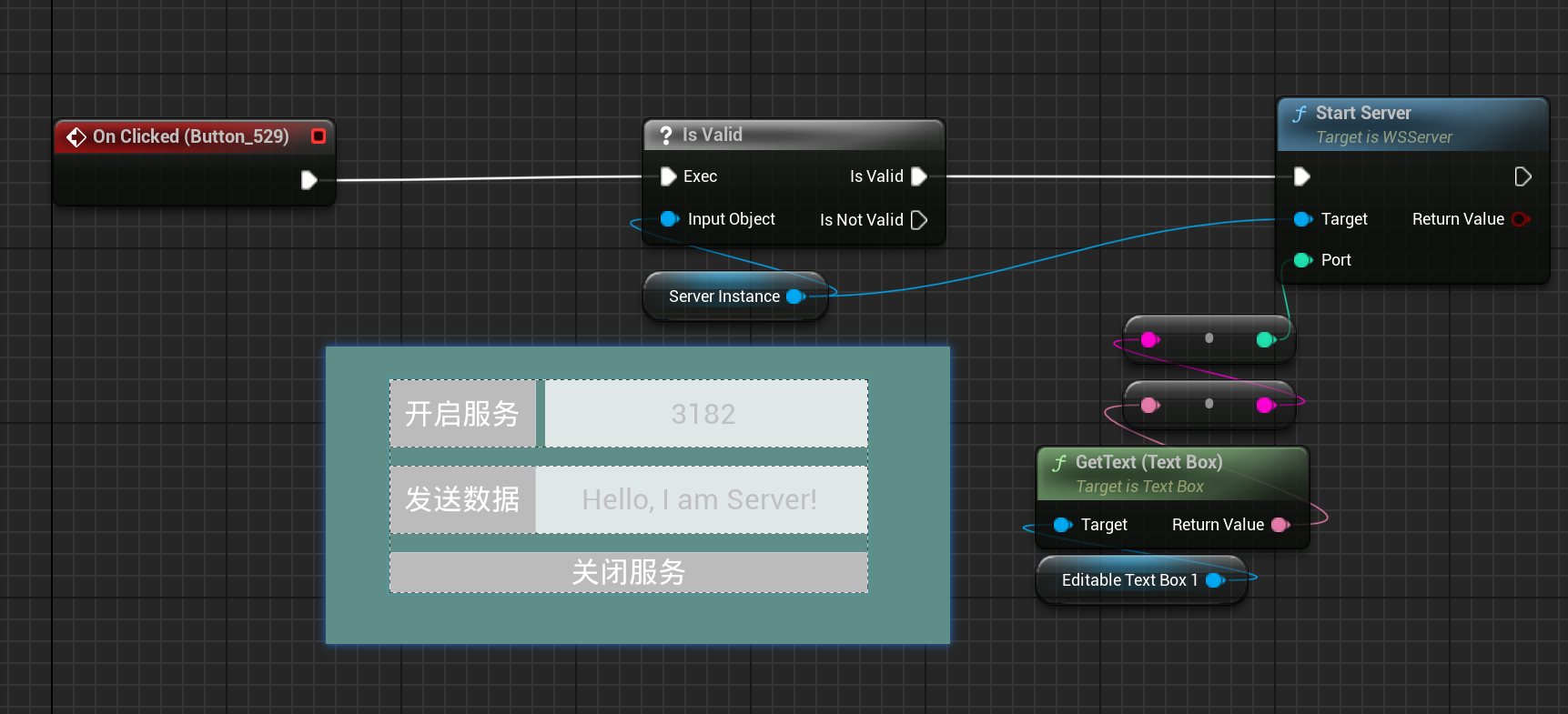
4、蓝图使用如图所示:
参考链接#
https://blog.csdn.net/ljason1993/article/details/123031678
https://docs.unrealengine.com/4.27/zh-CN/ProductionPipelines/ScriptingAndAutomation/WebControl/RemoteControlAPIWebsocketReference/
https://www.bilibili.com/video/BV18a4y1c74N/?spm_id_from=333.337.search-card.all.click&vd_source=4f9d167ab1a8f301688a50d993ad691a